Real-looking people in a product video, for $0, on a MacBook: I tested 5 methods
TL;DR
- I made the same 30-second story five ways to find the best free, local way to put real-looking people in a product video: free stock, AI images (SDXL), AI video (LTX-Video), Blender 3D and a lip-synced AI narrator.
- Everything ran on one MacBook Pro (M1 Max, 64 GB), cost $0, and used about 28 GB of models.
- The winner is AI images with SDXL: realistic, consistent characters at ~2 min per shot on the Mac GPU.
- AI video (LTX-Video) is the only method where people truly move, but it took 11–26 min per 5-second clip, and crowds and big motion melt.
- Surprise: the video model generates a clip in ~30 s. The other 95% of the time is decoding plus memory swap.
- Everything is open: live side-by-side dashboard · repo with inputs, outputs, scripts and logs · full report
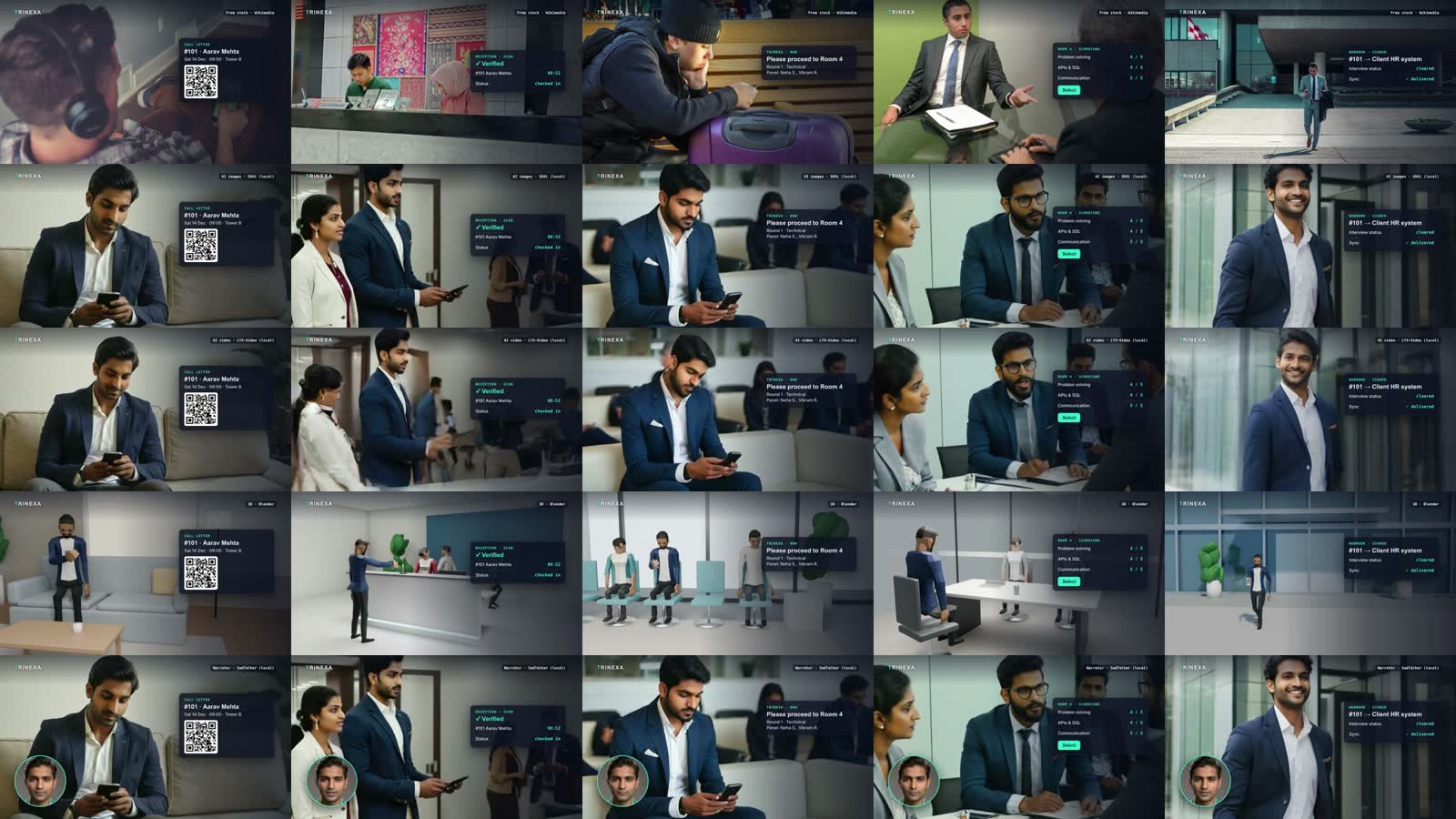 Same 30-second story, five ways. Rows top to bottom: free stock · AI images (SDXL) · AI video (LTX-Video) · Blender 3D · talking narrator (SadTalker). Columns are the five shots.
Watch the five results
1 · Free stock photos
Wikimedia Commons + Openverse. Real people, but a different person in every shot.
2 · AI images (SDXL) best value
RealVisXL V4 on the Mac GPU. Realistic and the same Aarav throughout.
3 · AI video (LTX-Video)
The SDXL stills animated image-to-video. People really move, but it's slow and fragile.
4 · Blender 3D
Free CC0 rigged characters on scripted sets. Fully controllable, but game-style.
5 · Talking narrator (SadTalker)
An AI presenter face lip-synced to the narration, shown as a corner bubble.
Who this is for
You make product demos, explainers or launch videos with code, an editor or a tool like Remotion or HyperFrames. Your app screens look great, but there are no humans: no customer, no user, no story. You want people in the video, you don't want to pay for footage or an AI video subscription, and you have a decent Mac.
By the end you'll know:
- which of the five free methods to use for which shot;
- what each one really costs in time on Apple Silicon, and why;
- the exact settings, prompts and patches that made them work, including the errors you'll hit and their fixes.
The problem
My explainer videos had a recurring hole. The product screens were sharp, but every "real world" moment (a candidate arriving, a phone buzzing, an interview) was a silhouette or an icon. Viewers connect with people. The usual answers are paid stock footage, a paid AI video tool, or filming. I wanted to know how far free and local gets you in 2026.
How I tested (methodology)
One story, five methods; only the people change. The story: Aarav gets a QR call letter for a walk-in interview → scans in at reception → waits in a lounge until his phone buzzes → interviews → his record is handed off to the company's HR system. That's 5 shots, 30.4 seconds in total.
Fairness controls. Every version shares:
- the same storyboard and shot timings (6.5 / 5.3 / 6.5 / 5.7 / 6.4 s);
- the same narration (Kokoro TTS, voice
am_michael, generated locally); - the same app overlay cards and the same music bed;
- the same assembly template, rendered with HyperFrames (HTML + GSAP → MP4) at 1080p.
Hardware. MacBook Pro, Apple M1 Max: 10-core CPU (8 performance + 2 efficiency), 32-core GPU, 64 GB of unified memory, macOS 26.5. There's no NVIDIA GPU, so "GPU" means the Apple GPU through PyTorch's mps backend or Blender's Metal renderer. I left my normal apps open (an IDE, a Linux VM, an editor), which turned out to matter.
What I measured.
- Wall-clock time per step, from logs.
- Which device each step ran on.
- Memory and swap.
- Seven quality criteria scored 1–5: realism, character consistency, motion, story fit, speed, reliability and licence clarity.
Prerequisites
| You need | Why |
|---|---|
| Apple Silicon Mac, ideally 32 GB+ of RAM | The AI video model needs ~25 GB of working memory in fp32 |
| ~30 GB of free disk | Model weights |
| Python 3.10 and 3.11, uv, ffmpeg | Two separate environments; SadTalker needs old pinned libraries |
| Blender 4.5 | Method 4. Use the blender.org DMG; the Homebrew cask asks for sudo |
| Node 18+ | npx hyperframes for the final assembly (any editor works) |
The models and their download sizes:
| Model | Used for | Size | Licence |
|---|---|---|---|
| RealVisXL V4 (SDXL, fp16) + fp16-fix VAE | AI images | 7.3 GB | Open RAIL++-M |
| LTX-Video 0.9.5 transformer + VAE | AI video | 6.3 GB | Open RAIL-M |
| T5-XXL encoder, bf16 copy | LTX text encoder | 9.5 GB (instead of 19 GB) | Apache-2.0 |
| SadTalker + GFPGAN weights | Narrator | 1.7 GB | Apache-2.0 |
| Quaternius animated characters | Blender | small | CC0 |
Method 1: free stock photos
How it works. Search Wikimedia Commons (its API needs no key) and Openverse for each shot. Filter licences to CC0, CC BY and CC BY-SA (never NC or ND), crop to 16:9, and add a slow camera push.
curl -s "https://commons.wikimedia.org/w/api.php?action=query&list=search&srnamespace=6&srsearch=filetype:video%20job%20interview&format=json"
Result. No usable free video exists for offices, receptions or interviews: the hits are under 720p or are news footage. So all five shots became photos. Each shot shows a different person, most aren't Indian, the "lounge" is a bus terminal, and in shot 1 we only see the back of a head.
Time: ~22 min of searching and reviewing. GPU: none. Verdict: real, and legally clean with attribution, but it can't tell your story with your character. Pexels has much better free video, but needs an API key.
Method 2: AI images with SDXL (the winner)
How it works. Write one fixed character description and reuse it in every shot prompt. Fix the seeds, generate 2 options per shot, and pick the best.
AARAV = "Aarav, a 26 year old Indian man, short neat black hair, light stubble, navy blazer over a white shirt"
STYLE = "photorealistic, candid documentary photo, 35mm lens, natural light, shallow depth of field, ..."

vae  = AutoencoderKL.from_pretrained("madebyollin/sdxl-vae-fp16-fix", torch_dtype=torch.float16)
pipe = StableDiffusionXLPipeline.from_pretrained("SG161222/RealVisXL_V4.0", vae=vae,
                                                 torch_dtype=torch.float16, variant="fp16").to("mps")
pipe.scheduler = DPMSolverMultistepScheduler.from_config(pipe.scheduler.config, use_karras_sigmas=True)
img = pipe(f"{AARAV}, sitting on a sofa ... looking down at his smartphone, {STYLE}",
           negative_prompt=NEG, width=1344, height=768, num_inference_steps=30,
           guidance_scale=5.5, generator=torch.Generator("cpu").manual_seed(1000)).images[0]
The fp16-fix VAE matters: the stock SDXL VAE in fp16 on Apple GPUs tends to decode black or NaN images.
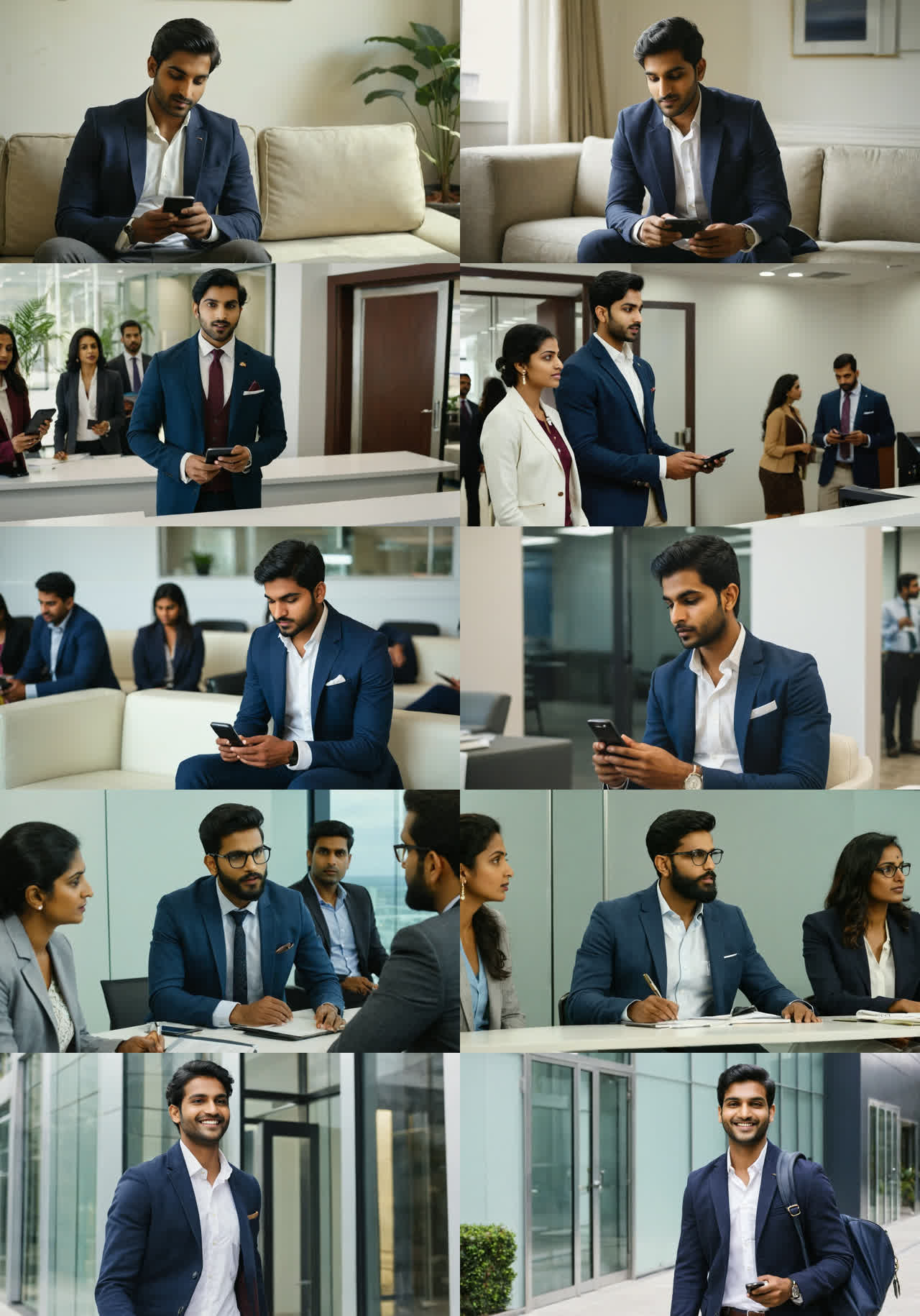 All 10 candidates, two per shot. Choosing took seconds.
Result. These look like candid office photos, and Aarav is recognisably the same person in most shots. Weaknesses:
- In the busy interview scene his identity drifted (glasses and a beard appeared).
- Prompts are followed loosely: no receptionist actually scans his phone.
- The images are stills, so motion comes only from the camera.
Time: 108–131 s per 1344×768 image (average 119 s), so 16 images took ~28 min. GPU: yes (MPS, fp16). Verdict: ⭐ the best realism per minute.
Method 3: AI video with LTX-Video (alive, but fragile)
How it works. Animate the method 2 stills with LTX-Video 0.9.5 image-to-video, prompting only the motion. Two memory tricks are essential on a Mac:
pipe = LTXImageToVideoPipeline.from_pretrained("Lightricks/LTX-Video-0.9.5",
                                               text_encoder=None, torch_dtype=torch.float32)
# 1) encode every prompt once on the CPU, then drop the 19 GB text encoder before generating
pipe.text_encoder = T5EncoderModel.from_pretrained("city96/t5-v1_1-xxl-encoder-bf16", torch_dtype=torch.float32)
emb = {s: pipe.encode_prompt(MOTION[s], NEG, do_classifier_free_guidance=True, device="cpu") for s in shots}
pipe.text_encoder = None; gc.collect()
pipe.to("mps"); pipe.vae.enable_tiling()          # 2) tiled decoding

pe, pm, ne, nm = (t.to("mps") for t in emb["s1"])
frames = pipe(image=still, prompt_embeds=pe, prompt_attention_mask=pm,
              negative_prompt_embeds=ne, negative_prompt_attention_mask=nm,
              width=768, height=448, num_frames=121, num_inference_steps=30, guidance_scale=3.0,
              generator=torch.Generator("mps").manual_seed(42)).frames[0]
Result. For one person with small motion it's genuinely convincing: Aarav smiles at his phone, and in the interview he talks and gestures while the panel listens.
 The interview clip at 0 s, 2.5 s and 5 s: natural talking and gesturing.
Crowds and big motion break it. The busy reception melts into a blur after ~3 s, and walking out of the building warps his body.
 The reception clip at 0 s, 2.5 s and 5 s: the crowd melts.
I rescued those two clips by keeping the clean first ~3 s and playing them forward then backward (ffmpeg ... trim,split,reverse,concat). The raw clips are in the repo.
Time:
- Quick test (49 frames, 20 steps): 278 s.
- Full clips (121 frames ≈ 5 s, 30 steps): 811, 681, 1,568, 1,381 and 804 s, ~87 min for all five.
GPU: yes (MPS, fp32; see the pitfalls). Verdict: use it for 2–3 hero moments, not a whole film.
Method 4: Blender 3D with free rigged characters
How it works.
- Download CC0 rigged and animated characters (Quaternius, via Poly Pizza; no login).
- Recolour them to match the cast and build sets from primitives.
- Script every shot in Blender Python and render headless with EEVEE on the GPU:
~/Applications/Blender.app/Contents/MacOS/Blender -b -P shots.py -- s1 full 1920 1080 24
Result. Every shot does exactly what the storyboard asks. He holds the phone to the scanner, the phone buzzes, he walks out, and nobody is stuck in a T-pose. But it looks like a video game:
- faces have no expressions and there's no lip-sync;
- the same three base models are reused for everyone;
- the sets are untextured.
Realistic free 3D humans are hard to get: Mixamo needs an Adobe login, and MetaHuman and Character Creator aren't free.
Time: ~35 min in total, of which 14 min was rendering 878 frames at 1080p. GPU: yes (Metal, EEVEE). Verdict: total control and consistency, but no realism.
Method 5: a talking AI narrator with SadTalker
How it works.
- Generate a fictional presenter face with SDXL (method 2).
- Lip-sync it to the full narration with SadTalker.
- Clean up the face with GFPGAN.
- Show it as a corner bubble.
python inference.py --driven_audio narration.wav --source_image presenter.png \
  --still --preprocess crop --enhancer gfpgan --size 256
Result. The lip-sync is frame-accurate across the full 30 s, but only the head moves, and at 512×512 it only works small. Match the face to the voice: my first presenter was a woman against a male voice, and it looked wrong.
Time:
- On the CPU: 24 s per step, projected at ~2.5 h.
- On the GPU after a patch: 11.7 min, about 13× faster.
- The GFPGAN clean-up then took 39 min on the CPU, because GFPGAN has no Apple GPU path.
GPU: partly. Verdict: a nice guide or presenter; it can't carry the story.
Results
| 1 · Stock | 2 · AI images | 3 · AI video | 4 · Blender | 5 · Narrator | |
|---|---|---|---|---|---|
| Realism | 5 | 4 | 4 | 2 | 3 |
| Same character throughout | 1 | 4 | 4 | 5 | 5 |
| People actually move | 1 | 1 | 4 | 3 | 2 |
| Matches the storyboard | 2 | 4 | 3 | 4 | n/a |
| Speed | 4 | 4 | 1 | 3 | 2 |
| Reliability | 4 | 5 | 2 | 4 | 3 |
| Licence clarity | 3 | 4 | 3 | 5 | 4 |
| Average | 2.9 | 3.7 | 3.0 | 3.7 | 3.2 |
| Time for 30 s | ~22 min | ~28 min | ~87 min | ~35 min | ~52 min |
| Ran on | CPU | GPU | GPU | GPU | GPU + CPU |
Blender ties SDXL on the average only because consistency and licence clarity weigh as much as realism. If "real-looking people" is the goal, SDXL wins clearly.
Where the time actually goes on a Mac
| Step | Device | Measured |
|---|---|---|
| SDXL image, 1344×768, 30 steps | GPU | 108–131 s |
| LTX-Video: generating a 5 s clip | GPU | 27–29 s (~1 step/s) |
| LTX-Video: decoding + swap for that clip | GPU + swap | 650–1,540 s |
| Blender, 878 frames at 1080p | GPU (Metal) | 14 min |
| SadTalker face renderer, 380 steps | CPU → GPU | 24.1 → 1.85 s per step |
| GFPGAN clean-up, 760 frames | CPU | ~3.1 s per frame |
| Assembling one 30 s video | CPU + headless Chrome | 63–93 s |
The biggest surprise: the AI video model isn't slow at generating. 95% of each clip's time went to decoding the frames while macOS swapped up to 32 GB to disk. The T5 encoder alone is 19 GB in fp32, and my IDE and VM were open. Unloading T5 after encoding cut the swap to 17.5 GB. Closing other apps is the single biggest speed-up.
Pitfalls and fixes
| Symptom | Cause | Fix |
|---|---|---|
Input type (float) and bias type (c10::BFloat16) should be the same |
M1 has no native bf16 | Load LTX-Video in fp32; it costs ~2× the memory |
Expected a 'mps' device type for generator but found 'cpu' |
A CPU random generator fed to an MPS pipeline | torch.Generator("mps") |
SadTalker: Conv3D is not supported on MPS |
Its pinned PyTorch 2.1 | Upgrade to PyTorch 2.5.1 and apply this 3-file patch |
SadTalker: invalid type: 'torch.mps.FloatTensor' |
CUDA-style .type() calls |
Covered by the same patch |
No module named 'pkg_resources' |
New setuptools | uv pip install "setuptools<70" |
basicsr import error on functional_tensor |
New torchvision | Change the import to torchvision.transforms.functional |
| SDXL produces black or NaN images in fp16 | The stock VAE overflows | Use madebyollin/sdxl-vae-fp16-fix |
| A 30 GB download takes hours | One slow stream | Download models in parallel with hf download, and use the bf16 T5 copy (9.5 GB, not 19 GB) |
brew install --cask blender asks for a password |
The cask needs sudo | Copy Blender.app from the official DMG into ~/Applications |
Which method should you use?
- You need a recurring, realistic main character → SDXL stills with a fixed character description and seeds, plus camera motion. Generate 2–3 options per shot.
- One hero moment needs real motion (a smile, a nod, someone talking) → LTX-Video on that SDXL still. One person, small motion, keep the clean seconds.
- The shot has a crowd or a person walking → keep it a still. Today's local video models melt here.
- You need exact staging (someone holds a phone to a scanner at a precise moment) → Blender, if a game look is acceptable.
- You want a presenter face → a SadTalker bubble with a voice-matched face.
- You need real people and don't care who → stock, ideally Pexels with a free API key.
Limitations
- One machine and one run per clip. No repeated runs, so no variance numbers. An M3 or M4, or a Mac with less load, will be faster.
- The scores are my judgement, not a user study. The repo has every output so you can judge for yourself.
- I picked the best of 2 seeds for the stills and trimmed two AI video clips. That's realistic practice, but it is curation.
- On an NVIDIA GPU (CUDA, bf16) the AI video steps would be many times faster; this is a Mac-specific result.
Reproduce it
git clone https://github.com/kartikjindal/local-character-video-5-methods-benchmark && cd local-character-video-5-methods-benchmark
uv venv .venv-ai --python 3.11 && uv pip install --python .venv-ai/bin/python -r requirements-ai.txt
./download-models.sh                                     # ~23 GB, in parallel
.venv-ai/bin/python gen_stills.py --seeds 2              # method 2
.venv-ai/bin/python gen_video.py --frames 121 --steps 30 # method 3
python3 -m http.server 8777                              # dashboard: compare all five
The SadTalker and Blender steps are in the README.
Conclusion
Free and local gets you surprisingly far. SDXL stills give realistic, consistent characters for ~2 minutes of GPU time per shot, and that should be the backbone. Local AI video is real but narrow: magic for one person making small movements, unusable for crowds, and slow on a Mac mainly because of memory, not compute. Everything here cost $0 and about 28 GB of disk.
What would you try next? I'm curious whether a newer local video model, or a Mac with more memory headroom, changes the AI video verdict. If you've run LTX-Video, Wan or HunyuanVideo on Apple Silicon, share your timings in the comments.
Resources
- ▶ Live side-by-side dashboard (all five videos in sync)
- 📦 Repo: inputs, outputs, scripts, logs
- 📄 Full report with every measured number
- Tools: RealVisXL V4 · LTX-Video · SadTalker · GFPGAN · Blender · Quaternius · Kokoro TTS · HyperFrames · ffmpeg
All AI faces in this post are fictional.